












Lossless Scaling review

Lossless Scaling Review: A Smart PC Tool for Sharper Visuals and Smoother Gameplay
Lossless Scaling is one of those utility tools that earns respect the moment you actually use it, not when you first hear about it. On paper, it sounds like a niche PC helper: a way to make older games look smoother, sharper, and more flexible on modern displays. In practice, it can feel like a small miracle for anyone who has spent years juggling frame caps, awkward fullscreen modes, and games that simply refuse to look right on a high-refresh monitor. As an experienced gamer, I appreciate software that gets out of the way and quietly improves the experience. This one does exactly that for the right kind of player.
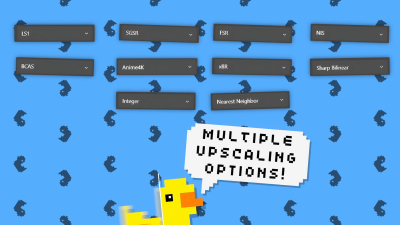
If you go in expecting a traditional game loop, you will miss the point. Lossless Scaling is more of a power tool than a game, but it sits in the same digital space as the best performance-focused mods: it changes how you play, not what you play. It helps older titles, indie games, and even some stubborn modern releases feel more comfortable on a bigger screen. The core appeal is easy to understand once you use it: better scaling, optional frame generation, and a more polished visual result without needing to dig through complicated driver settings every time.
A practical tool for players who care about image quality
The strongest thing about Lossless Scaling is how broad its use case can be. Some players will use it to scale pixel-art games cleanly. Others will use it to get stretched 4:3 classics looking proper on a widescreen monitor. And then there are players chasing smoother motion through frame generation. That flexibility is where it stands out. It is not trying to replace your GPU settings or behave like a magic fix for every PC problem, but it does fill a gap that many players have felt for years.
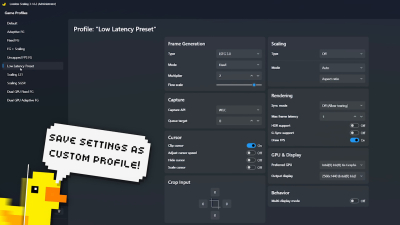
What I like most is that it respects the way people actually play. Not everyone wants to mess with launcher settings, borderless window workarounds, or external tools that break after every update. Lossless Scaling keeps things relatively straightforward. You launch it, choose your preferences, and try it on the game or app you already have. In an era where so many PC solutions feel overengineered, that simplicity matters.
How it feels in real use
The first time I tried it, I was testing a game that looked fine but felt oddly clunky on my monitor. After using the tool, the image presentation improved in a way that was easy to notice without being distracting. That is the best kind of visual enhancement: subtle enough to avoid calling attention to itself, but meaningful enough that you immediately prefer it. For retro titles and lightweight indie games, the difference can be dramatic. For more demanding games, it depends on your hardware and expectations, but the tool still has value.
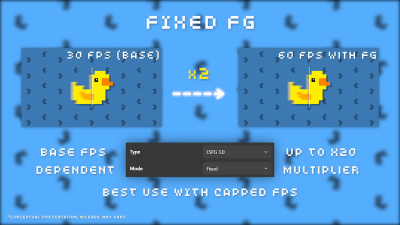
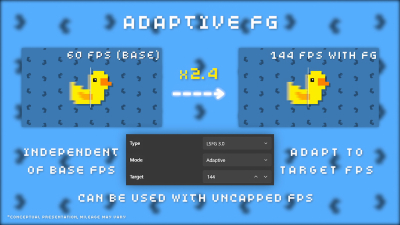
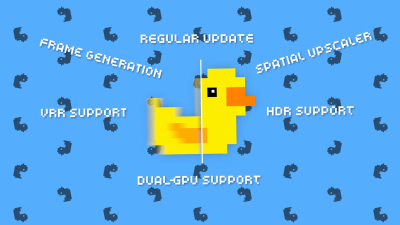
The frame generation side is more situational. When it works well, it can make motion feel much smoother, especially in games that already have decent baseline performance. However, like any tech in this class, it is not pure free performance. There can be trade-offs in latency or artifacting, so you need to know what you are aiming for. Competitive players should be careful here, but single-player fans will likely find a lot to like. As with many PC tweaks, the best results come from experimentation.
Why it appeals to experienced players
Veteran PC gamers are used to doing a lot of work just to make a game look right. Lossless Scaling reduces that friction. It becomes especially valuable when dealing with older design choices that were never built for modern resolutions. Think windowed games that do not scale cleanly, scaling filters that muddy the image, or performance quirks that make certain titles feel dated in all the wrong ways. This tool gives you more control without forcing you into a maze of settings.
It also scratches the same itch as good quality-of-life mods: the game becomes easier to enjoy on your terms. That is a big part of modern PC gaming culture. We like tweaks, we like options, and we like reclaiming old releases that were never meant to age gracefully. Lossless Scaling fits that mindset perfectly.
Presentation, usability, and learning curve
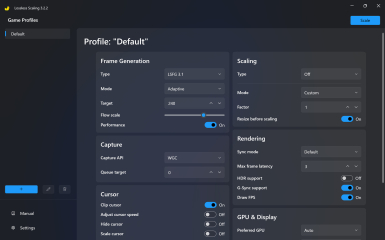
The interface is functional rather than flashy, which I consider the correct approach. A tool like this does not need cinematic menus or unnecessary flair. It needs clarity, and that is what it provides. New users may need a short learning period to understand which modes work best for each game, but it is not a painful process. The software is approachable enough for casual users while still offering enough control for players who enjoy fine-tuning.
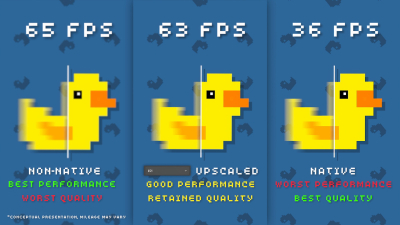
Performance impact is another area where expectations matter. No scaling tool is completely invisible. Depending on the game, the settings, and your hardware, you may notice resource usage or visual side effects. That said, the overall experience is usually stable if you use it wisely. It does a better job of being useful than pretending to be perfect, and I respect that. In PC gaming, honesty goes a long way.
Who should download it?
If you are the kind of player who likes making old games look current, this is an easy recommend. If you collect classic PC titles, use niche indie releases, or frequently revisit games with rough fullscreen support, you will probably find a real reason to keep this installed. It also makes sense for players with high-refresh displays who want to play older releases without them feeling visually disconnected from the rest of their setup.
On the other hand, if you only play one or two modern blockbuster games and you are happy with how they already run, you may not need it often. It is not a must-have in every library, but it is the sort of utility that quietly earns its place once you discover a few personal use cases.
Value and longevity
One of the best compliments I can give Lossless Scaling is that it adds long-term value to your PC library. Unlike a one-off gimmick, it grows more useful as your game collection expands. A tool like this can breathe life into older releases, help you revisit forgotten favorites, and even make certain new games more pleasant when they misbehave on your setup. That kind of utility has staying power.
I also appreciate that it does not lean on nonsense like cheats or shady workarounds. Its purpose is enhancement, not exploitation. Similarly, while there are community mods that try to solve similar problems in different ways, Lossless Scaling offers a cleaner central option for many users who want a reliable path without patch-hunting. In that sense, it feels like a mature PC tool made for people who understand the value of customization.
Final verdict
Lossless Scaling is not a flashy headline title, and it does not pretend to be one. It is better than that. It is useful, adaptable, and smartly aimed at an audience that cares about how games feel as much as how they play. For me, that makes it a strong recommendation for PC players who want more control over presentation and smoother motion without diving into a mess of separate fixes.
If your setup includes a backlog of older games, a monitor that outgrew those games, or a desire to make the most of your hardware, this tool can become indispensable. It is one of those rare utilities that does not need to be exciting to be excellent. It just needs to work, and Lossless Scaling mostly does.
How to download Lossless Scaling
Availability & Launch: Lossless Scaling is available on PC through digital storefronts, and it is not free. You can download it directly after purchase and launch it like a standard desktop utility.
Platforms: It is available on Windows PC. There is no native Mac or Android version, so those platforms are unsupported. If you want to use it elsewhere, you would need a cloud setup or another workaround, but native download is for PC only.
Install: After you install it from the storefront, open the app, grant any required permissions, and configure your scaling or frame generation settings before launching your game.
System Requirements: On PC, a modern Windows system with a reasonably recent CPU, GPU, and enough RAM for your games is recommended. Mac and Android are not supported natively, so there are no standard local requirements for those platforms.
Cheats / Mods: Cheats are not part of the tool, and it does not function as a cheat engine. Mods are not required, though some users combine it with game mods for visual or performance tweaks.
Unblocked Access: It is not generally intended for restricted environments like school or work networks, and access may depend on local rules or store permissions. If the store or app is blocked, you will not be able to download or use it normally.